
VCT vs a fleet spreadsheet
Most small fleets start with a spreadsheet: one row per vehicle, a column for the MOT, another for the tax. It works until a date goes stale and nobody notices. Here's what a spreadsheet does well, where it breaks, and how to move yours into VCT.
What a spreadsheet does well
There are good reasons so many fleets track vehicles in Excel or Google Sheets.
It's free
You already have it. There's no subscription, and for two or three vehicles that's hard to argue with.
It's flexible
Add any column you like: fuel cards, keys, tyre sizes, who to call when the van breaks down.
Everyone knows how to use it
No training, no logins to set up. Anyone in the office can open it and read it.
Six ways a fleet spreadsheet lets you down
Dates go stale
A date is only right on the day someone types it. Renew the tax early or move an MOT and the sheet still shows the old date until someone updates it.
Nobody re-checks DVLA and DVSA
The official records are on gov.uk, one registration at a time. Checking a whole fleet by hand every month rarely happens.
Check sheets stay on paper
Daily walkaround checks end up on paper in a cab or a tray. They're hard to find later, and missing ones go unnoticed.
Defects get lost
A driver mentions a faulty brake light. It goes in a cell comment, an email or someone's memory, and nobody owns the fix.
No audit trail
When an insurer or auditor asks what was checked and how fast defects were fixed, a spreadsheet can't show who changed what, or when.
Reminders depend on memory
The sheet only helps if someone opens it. If that person is off sick or leaves, the reminders stop.
The cost of a missed date is real. Gov.uk says you can be fined up to £1,000 for driving without a valid MOT. You can look up any vehicle with the MOT history checker and the vehicle tax checker; the trouble is doing it for every vehicle, every month.
Spreadsheet or VCT
| Task | Spreadsheet | VCT |
|---|---|---|
| MOT and tax dates | Partly. Typed in by hand and updated when someone remembers | Yes. Checked with DVLA and DVSA every night |
| Reminders | No, unless someone opens the sheet | Yes. Emails before expiry and a weekly round-up; texts as an add-on |
| MOT history and advisories | No | Yes, every test, advisory and mileage from DVSA |
| Daily walkaround checks | No. Usually paper sheets | Yes, on drivers' phones |
| Defects | Partly. A note in a cell | Yes. Work queue with an owner, cleared by a later green check |
| Who has which vehicle | Partly. A column you keep up to date | Yes. Bookings timeline with clashes caught |
| Audit trail and compliance pack | No | Yes. Compliance pack PDF for a period and depot |
| Custom columns | Yes, anything you like | Partly. Choose which columns to show in the fleet table |
| Cost | Free | £3.50 per vehicle a month, falling to £2.50 per vehicle for bigger fleets (minimum £35 a month), ex VAT |
Bring your spreadsheet with you
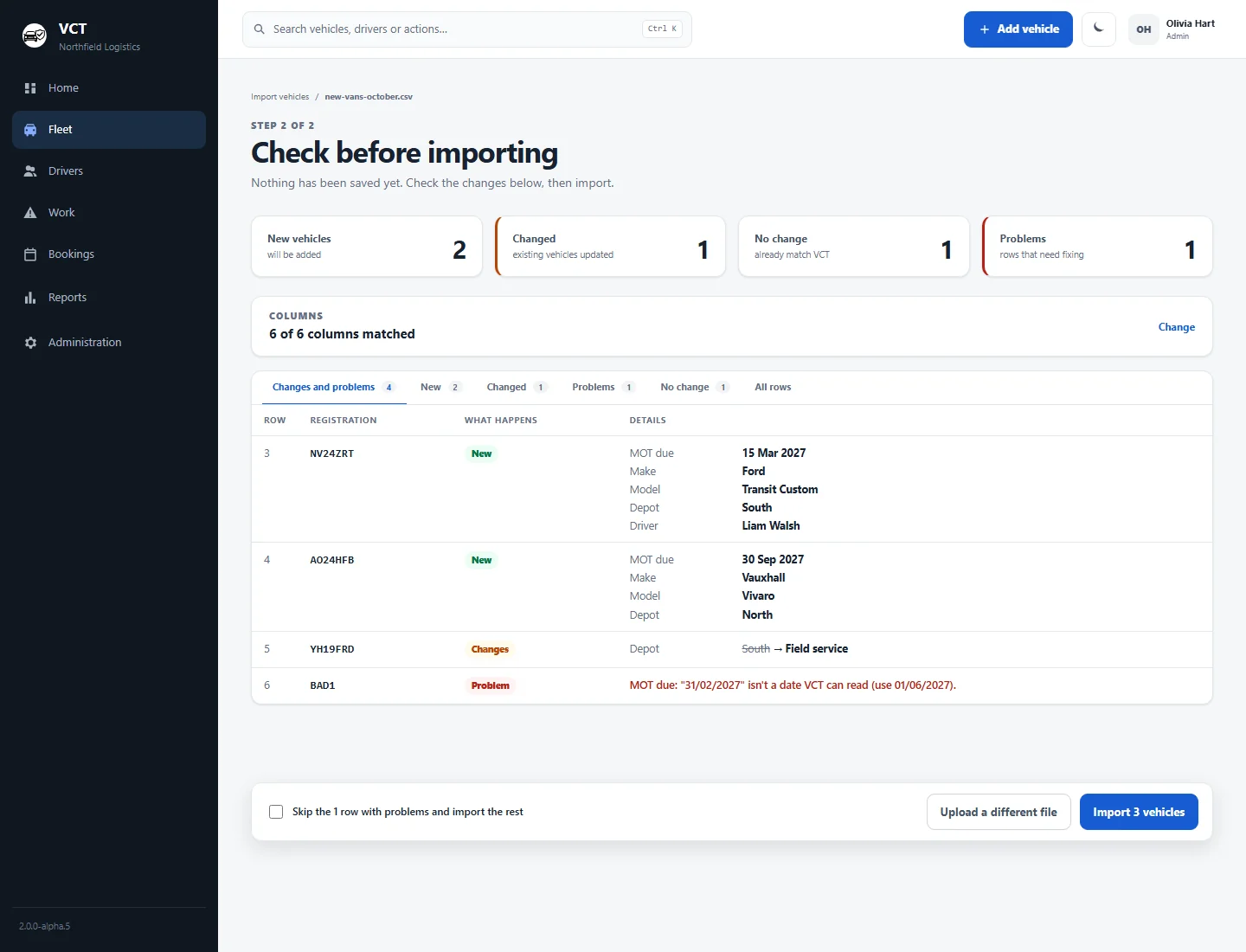
You don't have to start again. Save your spreadsheet as a CSV and upload it to VCT. VCT matches your columns, then shows exactly what will happen before anything is saved.
- Which vehicles are new and what changes on existing ones, old and new values side by side
- Plain explanations of problem rows, for example a date that doesn't exist
- Skip the problem rows and import the rest
- Every vehicle is then checked with DVLA and DVSA, so the dates are current from day one
Want help? We'll import your current spreadsheet with you. And if you ever need a spreadsheet again, the fleet table exports.
A fleet spreadsheet template that works
If a spreadsheet suits you for now, give it these columns: registration, make and model, driver or depot, MOT due, road tax due, insurance renewal, next service, and the date someone last checked each date against gov.uk. Put a reminder in your calendar to check every vehicle once a month, and keep walkaround check sheets somewhere you can find them. The same columns import straight into VCT when you're ready.
Price context
A spreadsheet costs nothing. VCT costs £3.50 per vehicle a month, falling to £2.50 per vehicle for bigger fleets (minimum £35 a month), ex VAT. That's £81.25 for 25 vehicles and £150 for 50, paid monthly with no contract. Text reminders for drivers are an add-on at £10 a month for up to 200 texts. A free plan for up to 5 vehicles, with MOT and tax checks and reminders, is coming soon.
Looking at other tools? Compare VCT vs FleetCheck and VCT vs Fleetkeep, or read about fleet MOT and tax reminders, the walkaround check app and small fleet management software.
Fleet spreadsheet FAQs
What columns should a fleet spreadsheet have?
At least the registration, make and model, driver or depot, MOT due date, road tax due date, insurance renewal, next service and the date someone last checked each one. Those same columns import straight into VCT.
Can I import my fleet spreadsheet into VCT?
Yes. Save it as a CSV and upload it. VCT matches the columns and shows a preview of which vehicles are new, what changes on existing ones and which rows have a problem, before anything is saved. You can skip the problem rows and import the rest.
Can I still get my data out as a spreadsheet?
Yes. You can export the fleet table, and the bookings timeline exports to a spreadsheet or a calendar file.
How often does VCT check MOT and tax?
Every night. VCT checks each vehicle's road tax with DVLA and its MOT or HGV annual test with DVSA. Admins can also recheck one vehicle or the whole fleet at any time.
How much does VCT cost compared with a free spreadsheet?
VCT costs £3.50 per vehicle a month, falling to £2.50 per vehicle for bigger fleets (minimum £35 a month), ex VAT, monthly with no contract. A free plan for up to 5 vehicles, with MOT and tax checks and reminders, is coming soon.
See it with one of your own vehicles
Enter a registration and your email on the homepage. We'll send you a link to a demo of VCT with your vehicle looked up live with DVLA and DVSA.