
Weekly round-up
One email a week, on the day you choose, to admins and managers: road-legal status, what needs action, and what is due in the next 30 days.
VCT checks every vehicle's MOT and road tax with DVLA and DVSA overnight, collects drivers' daily walkaround checks from their phones, and puts whatever needs a decision at the top of one page.
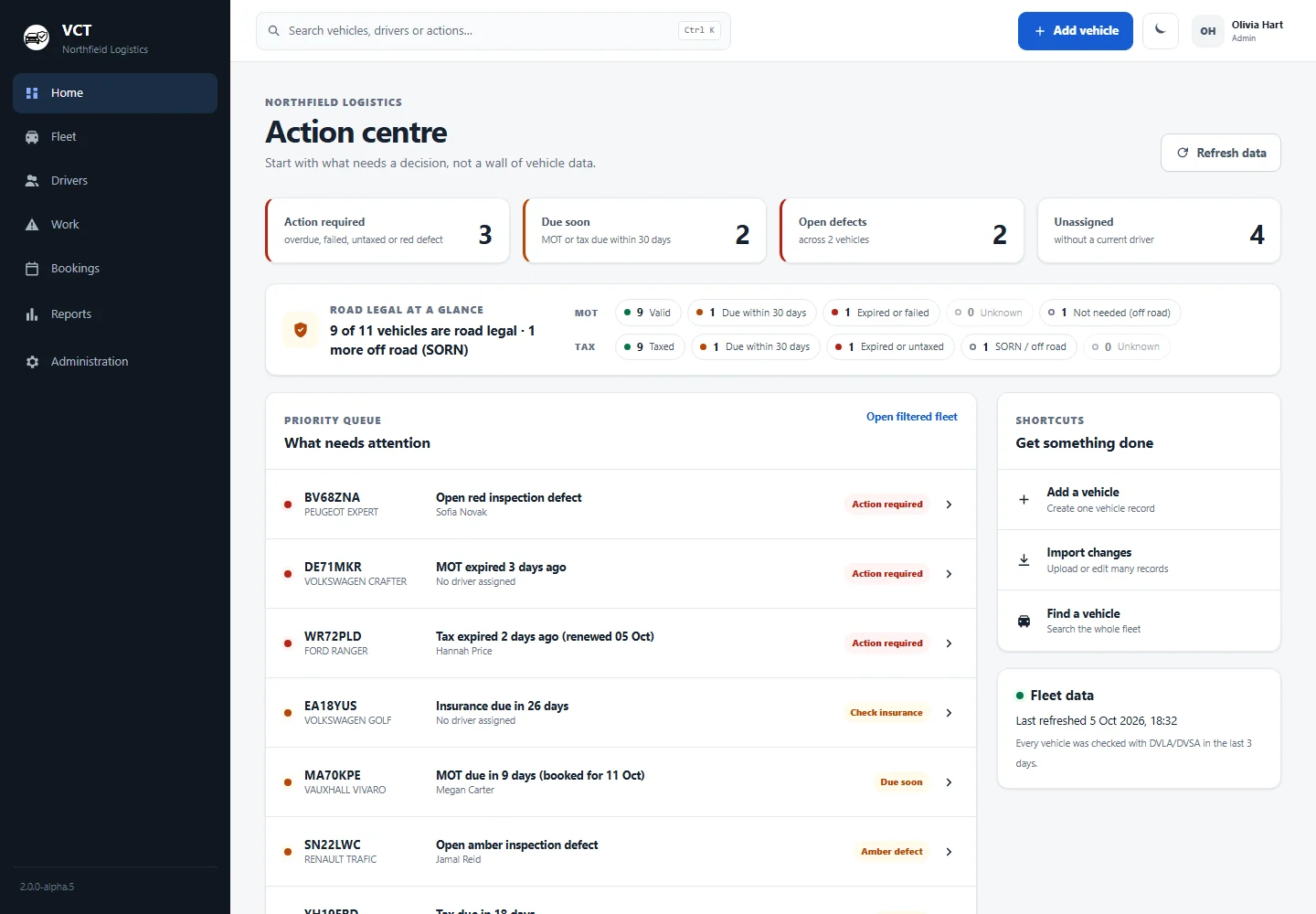
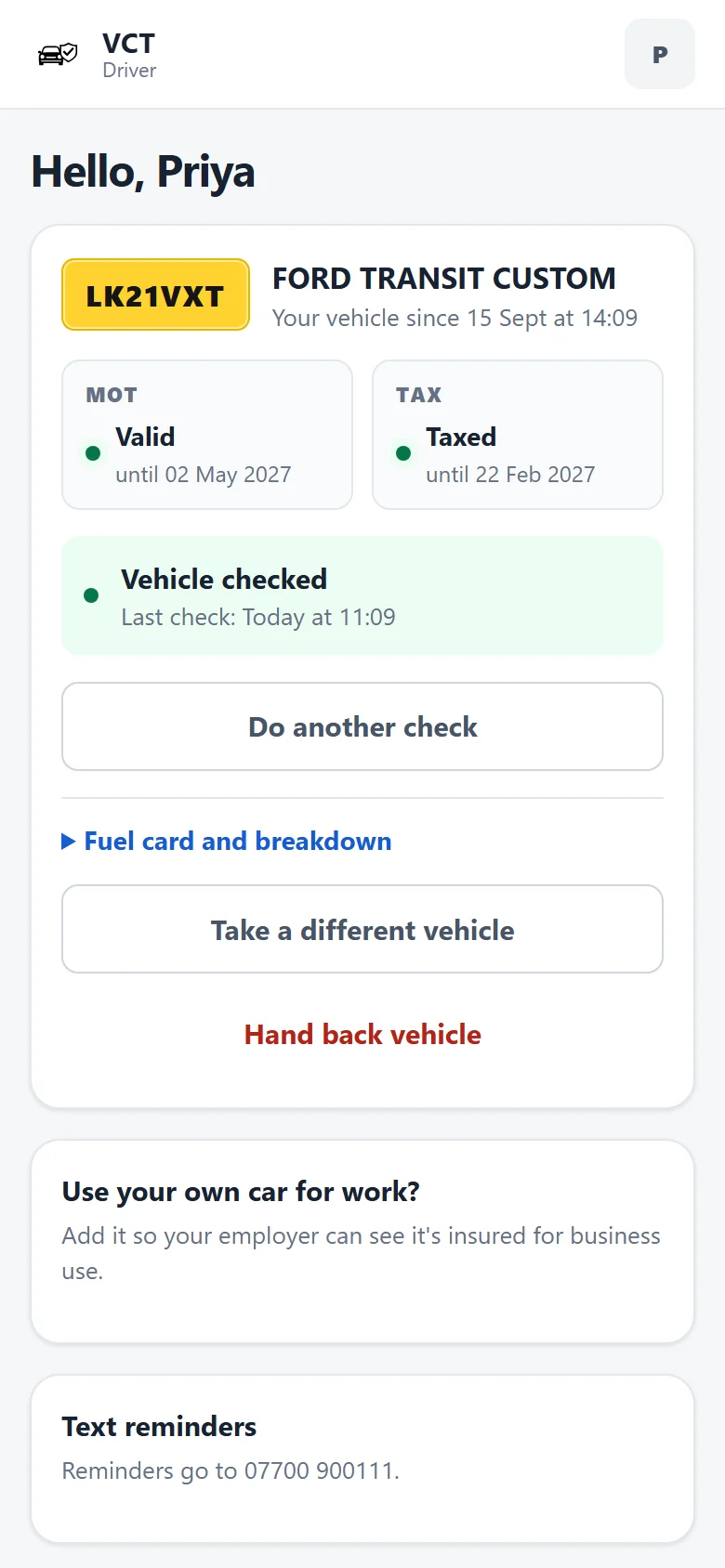
Fleet software usually opens with a wall of vehicle data. VCT opens with the handful of things that need you today, and keeps the full detail one click away.
The headline says it plainly: how many vehicles are road legal (taxed, with a valid MOT), and how many are off the road. Below that is a priority list, worst first: an open red defect, an expired MOT, tax that has run out.
For the people who live in spreadsheets. Filter by MOT, tax, status, driver or depot. Change status, driver or notes right in the row. Choose your columns, export what you see, or recheck the whole fleet with DVLA.
Each vehicle has one page: MOT and tax dates with days remaining, who is driving it, recent inspections, open defects, and the full MOT history from DVSA with the advisories that are worth watching.
Drivers open VCT on their phone, see the vehicle they have, and tap through the walkaround. Anything marked red or amber goes straight to the office with the driver's note.
Managers get the same thing on their phones: the Action centre works at any size.
Every red or amber item from a check lands in the work queue. Give it an owner and track it through to done. Critical items sit at the top until they are dealt with.
The defect itself only clears when a later check on that vehicle marks the same item green, so nothing drops off the list just because somebody said it was fixed.
A timeline for the whole fleet. Drag across the days you need, or click an empty slot to book. Long-term driver assignments show as a striped bar that runs until further notice.
Upload the CSV you already have. VCT matches the columns, then shows exactly what will happen before anything is saved: which vehicles are new, what changes on existing ones, and which rows have a problem.
Choose a period and a depot, and VCT builds an audit-ready PDF: road-legal status now, every inspection, every defect and how fast it was fixed, MOT tests, services and what they cost.
Ready for an insurer's renewal, an O-licence audit or a DVSA visit.
DVLA and DVSA cover vans, cars and trucks alike, so VCT checks a mixed fleet the same way every night. Staff cars used for work sit alongside company vehicles.
DVSA's heavy-vehicle test history starts in 2018, and trailers can't be checked automatically because they have no registration number. Compare VCT with FleetCheck or a spreadsheet.
Every count in VCT comes from a few simple rules that are the same on every page, in every email and in every report.
MOT expired or failed, no tax, or an open red defect. These go to the top of every list.
MOT or tax runs out within 30 days. If a booking or renewal is recorded, VCT says so.
A defect stays open until a later check marks the same item green.
SORN vehicles are off the road. They don't count against you and don't get reminders.
Staff cars used for work show business insurance expiry next to company vehicles.
Every date and time is shown in UK time, through the clock changes.
The small things that save a fleet manager an hour a week.
One email a week, on the day you choose, to admins and managers: road-legal status, what needs action, and what is due in the next 30 days.
Subscribe once in Outlook, Google or Apple Calendar. Every MOT, tax, booked MOT and insurance date keeps itself up to date.
Who is driving what, how many checks each person has done in the last 30 days, and who is reporting open defects.
Every page has a dark theme for the early starts and the late finishes.
Press Ctrl K anywhere in VCT and type a registration, make or driver to jump straight to it.
One click for the lists you check every week: needs attention, due soon, not verified, unassigned and grey fleet.
Switch it on and VCT texts drivers when the MOT, tax or insurance on the vehicle they use is about to run out, and nudges anyone who hasn't done the day's check.
£3.50 per vehicle a month, falling to £2.50 for fleets of 150 or more. The minimum is 10 vehicles (£35 a month). Everything is included, you pay monthly and you can cancel at any time.
Everything on this page, for every vehicle you add.
£81.25 a month in total for 25 vehicles
£3.50 per vehicle from 10 vehicles, £3.25 from 25, £3.00 from 50, £2.75 from 100 and £2.50 from 150.
Running more than 200 vehicles? Get in touch and we'll build a price around your fleet.
Reminders and check nudges sent to drivers' phones.
Price promise: if our prices go up, you keep the price you signed up at. If we ever need to change it, we'll tell you first. If our prices come down, they come down for everyone.
Free plan coming soon: up to 5 vehicles with MOT and tax checks and reminders. Tell us you're interested. Over 200 vehicles? Get in touch for a price built around your fleet.
Fleet records include people's details, so we keep them close and you in control.
VCT runs on servers in Frankfurt, and uploaded photos and invoices are kept in EU storage.
Your vehicles, drivers, checks, defects, bookings and records are yours. Export them whenever you like.
Admins, managers and drivers each see what they need. Drivers only ever see their own vehicle.
Monthly, with no contract. If you ever leave, take a full export of your data with you.
Every connection is encrypted (HTTPS), and passwords are stored hashed, never as plain text.
MOT and tax details come straight from DVLA and DVSA, so you're not relying on dates someone typed in.
Every night VCT checks each vehicle's road tax with DVLA and its MOT, or HGV annual test, with DVSA, using the registration number. You can also recheck one vehicle or the whole fleet at any time. Anything that has run out goes to the top of the list, and anything due within 30 days is flagged.
Vans, cars, trucks (HGVs) and grey fleet, the staff cars used for work. DVSA's records cover HGV annual tests as well as MOTs, so a mixed fleet sits in one place. Trailers have no registration number, so VCT can't check them automatically.
No. Drivers open VCT in their phone's web browser and do their daily walkaround check there. There's nothing to install from an app store.
You can edit the checklist to match DVSA's walkaround check guidance for vans or HGVs. VCT helps you do the checks and keep the records; it isn't approved or accredited by DVSA.
£3.50 per vehicle a month, falling to £2.50 per vehicle for bigger fleets (minimum £35 a month), ex VAT. Everything is included. Text messages are an optional add-on at £10 a month for up to 200 texts.
No. VCT is paid monthly and you can cancel at any time. A free plan for up to 5 vehicles, with MOT and tax checks and reminders, is coming soon.
Not without you hearing from us first. If our prices go up, existing customers keep the price they signed up at, and if we ever need to change yours we'll tell you in advance. If our prices come down, they come down for everyone, including existing customers.
In the EU. VCT runs on servers in Frankfurt and keeps uploaded photos and invoices in EU storage. You can export everything at any time, and because VCT is monthly with no contract, you're never locked in.
You can record licence checks and consent in VCT, drivers can share their DVLA check code from the driver app, and VCT shows when each check is due. Automatic licence checks with DVLA are coming soon.
Yes. The compliance pack is a PDF for any period and depot: road-legal status, every inspection, every defect and how quickly it was fixed, MOT tests, services and costs.
Tell us about your fleet and we'll show you VCT with your own vehicles. Or just ask a question.
info@thevct.co.uk